

You want to trade your daily commute for a dual-monitor setup in your living room, but the sheer noise of online job boards feels overwhelming. If you are actively searching for remote help desk jobs, you already know the demand is massive. Companies across the globe are abandoning physical offices, leaving IT support teams fully distributed.
Here is the cold, hard truth: hundreds of applicants click “Easy Apply” on every posting within minutes. To land a high-paying role today, you need more than basic tech knowledge. You need a targeted strategy.
This blueprint breaks down the exact process required to get noticed, pass ATS screeners, master technical interviews, and secure your remote IT support role.
Blueprint Step 1: Target the Highest-Paying Remote Help Desk Niches
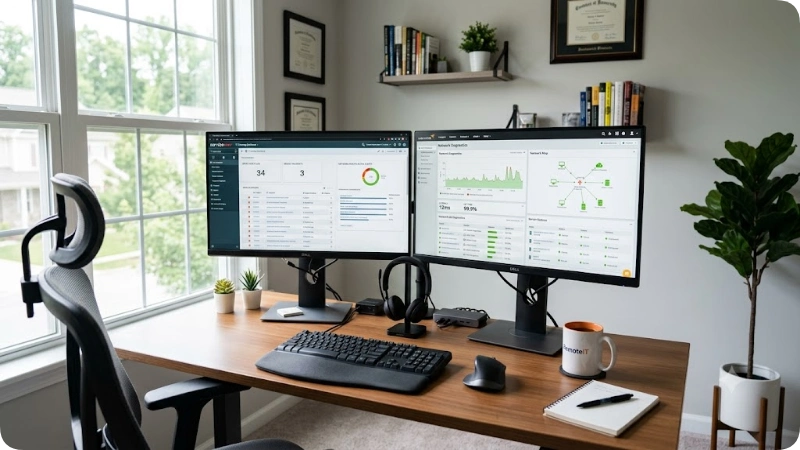
Not all IT support roles pay the same. A generic customer service representative answering password reset calls earns far less than a specialized technical analyst supporting cloud environments. To maximize your earning potential, you must position yourself in high-value niches.
Salary Comparison Across Remote IT Support Tier Levels
The table below outlines real-world compensation expectations, required skills, and growth pathways for remote help desk positions in 2026.
| Role / Tier Level | Average Annual Salary | Key Technical Requirements | Typical Daily Responsibilities |
| Tier 1: Help Desk Technician | $42,000 – $55,000 | Active Directory, Windows 11/Mac OS, Ticketing (Zendesk, ServiceNow) | Password resets, basic software troubleshooting, user onboarding |
| Tier 2: Desktop / Technical Specialist | $58,000 – $78,000 | PowerShell scripting, VPN/Network config, Azure AD, MDM solutions | Advanced OS repairs, hardware diagnostic guidance, network routing issues |
| Tier 3: Systems & Network Support Analyst | $80,000 – $105,000 | AWS/Azure infrastructure, Virtualization, Cisco routing, Security protocols | Server outages, complex cloud infrastructure support, escalation management |
| Healthcare IT Support Specialist | $50,000 – $72,000 | EHR systems (Epic/Cerner), HIPAA compliance knowledge | Clinical application support, secure data transmission troubleshooting |
| SaaS Customer Support Engineer | $65,000 – $90,000 | REST APIs, SQL queries, HTML/CSS, log analysis | B2B software troubleshooting, bug reproduction, escalation to developers |
If you are starting out, focus on Tier 1 roles that offer fast internal promotion tracks. If you have any background in databases or coding, skip general support entirely and aim for SaaS customer support engineering.
Blueprint Step 2: Build an ATS-Optimized Resume That Beats the Algorithms
Applicant Tracking Systems (ATS) reject roughly 75% of resumes before a human recruiter ever sees them. Hiring managers set strict keyword filters based on hardware, operating systems, and ticketing software.
If your resume uses fancy columns, complex graphics, or generic summaries, it will end up in the digital trash bin.
Weak Resume vs. High-Converting ATS Resume
| Resume Element | Weak / Standard Resume | High-Converting ATS-Optimized Resume |
| Professional Summary | “Hardworking individual looking for a remote help desk job with room for growth.” | “CompTIA A+ certified Remote Help Desk Specialist with 3+ years resolving Tier 1/2 tickets across Active Directory, ServiceNow, and Office 365 environments.” |
| Skills Section | Soft skills like “Good communication, punctual, fast learner, computer savvy.” | Technical skills like “Active Directory, PowerShell, ServiceNow, Zendesk, TCP/IP, VPN configuration, Azure AD, macOS.” |
| Work Experience | “Handled customer phone calls and fixed computer problems when they broke.” | “Maintained 98.5% CSAT score while resolving 40+ daily tickets via ServiceNow, reducing average resolution time by 18%.” |
| Keywords | Uses generic terms without context. | Integrates exact match keywords from the job description directly into bullet points. |
When writing your resume, quantify your achievements. Use metrics like ticket resolution rates, Customer Satisfaction (CSAT) scores, and average handle times.
To ensure your document passes parsing algorithms without structural flaws, test your draft through our free ATS Resume Builder Tool before sending out applications.
Blueprint Step 3: Source Unadvertised Remote Opportunities
Relying exclusively on massive, public job aggregators puts you in direct competition with thousands of candidates. Elite job seekers use a diversified sourcing strategy to find roles before they get flooded.
1. Managed Service Providers (MSPs)
MSPs handle outsourced IT infrastructure for dozens of small-to-midsize businesses. They operate on strict SLAs (Service Level Agreements) and constantly hire remote help desk technicians to maintain coverage across multiple time zones. Look up companies like Dataprise, All Covered, or local MSPs hiring nationally.
2. Specialized Remote Tech Platforms
Instead of filtering through millions of non-technical postings, narrow your focus to remote-first platforms:
- Dice: Excellent for contract-to-hire IT roles.
- Built In: Best for tech startups offering competitive salaries and remote flexibility.
- FlexJobs: Vetted remote postings with zero spam listings.
3. Boolean Search Strings
Use targeted Google search queries to uncover unlisted career pages directly on company websites:
"remote help desk" AND "careers" OR "job opening" -site:indeed.com -site:ziprecruiter.com
If you want to save hours filtering irrelevant postings, leverage our automated Job Matchmaker Tool to scan listings aligned directly with your technical background.
Blueprint Step 4: Master the Technical & Behavioral Interview Process
Remote hiring managers worry about two primary risks: whether you can solve problems independently without someone standing over your shoulder, and whether you possess clear, empathetic communication skills over text and phone calls.
Expect a three-stage interview process:
- Recruiter Screen (15-20 min): Verifies basic qualifications, salary expectations, and remote work setup.
- Technical Assessment (30-45 min): Scenario-based troubleshooting questions or a live ticketing exercise.
- Managerial / Culture Interview (30-45 min): Behavioral scenarios testing communication under pressure.
Top Technical Interview Questions & How to Answer Them
“A user calls saying their internet isn’t working. How do you troubleshoot this remotely?”
- The Strategy: Demonstrate a logical, layer-by-layer troubleshooting methodology (the OSI model concept made simple).
- Your Answer: Start by isolating the problem. Ask if the issue affects a single website or the entire device. Check if other devices on their local network are connected. Guide them to verify physical connections (ethernet/Wi-Fi toggle), run
ipconfig /allorpingcommands to test gateway connectivity, and check VPN status before escalating to ISP or network teams.
“How do you prioritize tickets when five urgent requests arrive at the exact same time?”
- The Strategy: Show that you understand business impact versus individual preference.
- Your Answer: Prioritize based on severity and operational impact. A complete server outage or an entire department locked out takes precedence over a single user needing software installed. Communicate clear expectations immediately to users with non-critical requests so they know their issue is logged.
Blueprint Step 5: Set Up a High-Efficiency Home Office
Winning the job offer is only half the battle. Thriving in remote help desk jobs requires a workspace designed for high volume, speed, and focus.
⚡ Optimal Dual-Monitor Remote Workstation Setup
Ticketing Queue
ServiceNow / Zendesk
Remote Access
TeamViewer / AnyDesk
USB Headset
Noise-Canceling & Clear Audio
Hardwired Ethernet
50+ Mbps Low-Latency Connection
Essential Workstation Gear Check
- Dual Monitors: Efficiency drops dramatically on a single screen. Monitor A holds your ticketing queue; Monitor B handles active remote control sessions (e.g., TeamViewer, AnyDesk) and documentation lookups.
- Noise-Canceling USB Headset: Essential for clear call audio without background noise interference.
- Hardwired Ethernet Connection: Wi-Fi drops cause lost calls and disconnected remote desktop sessions. Aim for at least 50 Mbps download / 10 Mbps upload with low latency.
- Uninterruptible Power Supply (UPS): Keeps your router and laptop running during brief neighborhood power blinks.
Frequently Asked Questions
Can I land a remote help desk job with no prior tech experience?
Yes. Many companies hire entry-level support representatives based on soft skills and customer service history, provided you hold a foundational certification like CompTIA A+ or Google IT Support Professional Certificate. Highlighting personal home lab projects or voluntary tech assistance on your resume also demonstrates real competence.
Do remote help desk technicians need to supply their own hardware?
No. Most established companies supply enterprise laptops, monitors, headsets, and security peripherals before your first day of training. Some organizations offer a work-from-home stipend (typically $250 to $500) to help you outfit your home workspace.
Is an IT degree required to secure remote help desk positions?
No. Industry certifications, practical troubleshooting ability, and solid communication carry far more weight than a four-year degree for support roles. Practical experience combined with industry-standard credentials like CompTIA A+, Network+, or Microsoft Fundamentals routinely beats academic qualifications.
Final Strategy for Securing Remote Help Desk Jobs
Landing competitive remote help desk jobs comes down to deliberate execution rather than luck. Treat your search like a system: target high-demand niches, format your resume specifically for applicant parsing software, expand your search beyond general job boards, and practice structured technical answers. Apply systematically, keep refining your approach, and you will secure a remote support role that offers flexibility and long-term career growth.
